|
Seeders
1. Persons
Windows:
Clone seeder from https://gitlab.com/owitech/person_module.
Edit appsettings.json:
- DB:ConnectionString - connection to mongodb
- DB:Database - person database name
Run Persons.Database.exe
Linux:
Clone seeder from https://gitlab.com/owitech/person_module_linux
Edit appsettings.json:
- DB:ConnectionString - connection to mongodb
- DB:Database - person database name
Run ./Persons.Database (add execution rights if needed ‐sudo chmod +x Persons.Database‐)
2. IdentityServer
Windows:
Clone seeder from https://gitlab.com/owitech/auth_module.
Edit appsettings.json:
- DB:ConnectionString - connection to mongodb
- DB:Database - auth database name
Run Authentication.Database.exe
Linux:
Clone seeder from https://gitlab.com/owitech/auth_module_linux
Edit appsettings.json:
- DB:ConnectionString - connection to mongodb
- DB:Database - auth database name
Run ./Authentication.Database
Then:
Connect to auth database, open ‐Client‐ collection and edit urls:
1) ClientId=notification_module:
a) ‐RedirectUris‐ section update http://localhost:61232/signin-oidc to http://notification.module.lv/signin-oidc
b) ‐PostLogoutRedirectUris‐ section update http://localhost:61232/Home to http://notification.module.lv/Home
2) ClientId=persons_module:
a) ‐RedirectUris‐ section update http://localhost:61236/signin-oidc to http://person.module.lv/signin-oidc
b) ‐PostLogoutRedirectUris‐ section update http://localhost:61236/Home to http://person.module.lv/Home
3) ClientId=audit_module:
a) ‐RedirectUris‐ section update http://localhost:8105/signin-oidc to http://audit.module.lv/signin-oidc
b) ‐PostLogoutRedirectUris‐ section update http://localhost:8105/Home to http://audit.module.lv/Home
4) ClientId=users_module:
a) ‐RedirectUris‐ section update http://localhost:8000/signin-oidc to http://user.module.lv/signin-oidc
b) ‐PostLogoutRedirectUris‐ section update http://localhost:8000/Home to http://user.module.lv/Home
3. Configuration
Windows:
Clone seeder from https://gitlab.com/owitech/configuration_module.
Edit appSettings.json:
- DB:ConnectionString - connection to mongodb
- DB:Database - config database name
- Settings:AuditSettings:Enable - enable/disable audit log (true/false)
- Settings:AuditSettings:Username - username for rabbitmq
- Settings:AuditSettings:Password - password for rabbitmq
- Settings:AuditSettings:VirtualHost - virtual host at rabbitmq
- Settings:ModuleURLs:AuthModuleUrl - url for identity server (is.module.lv)
- Settings:ModuleURLs:UserModuleUrl - url for identity server web (user.module.lv)
- Settings:ModuleURLs:AuditModuleUrl - url for audit web (audit.module.lv)
- Settings:ModuleURLs:PersonModuleUrl - url for person web (person.module.lv)
- Settings:ModuleURLs:NotificationModuleUrl - url for notification web (notification.module.lv)
- Settings:ModuleAPIs:NotificationModuleApi:URL - url for notification api (notification-api.module.lv)
- Settings:ModuleAPIs:PersonsModuleApi:URL - url for person api (person-api.module.lv)
- Settings:ModuleAPIs:AuthModuleApi:URL - url for identity server (is.module.lv) - same as Settings:ModuleURLs:AuthModuleUrl
Run Configuration.Seeder.exe
Linux:
Clone seeder from https://gitlab.com/owitech/configuration_module_linux
Edit appSettings.json: same as for windows
Run ./Configuration.Seeder
4. Notifications
For creating MS SQL database for notifications module, you should:
1) Attach to running MS SQL container(image at registry.gitlab.com/owitech/notification_module/mssql)
docker exec -it {id of ms sql container} bash
2) Run command:
/opt/mssql-tools/bin/sqlcmd -S localhost -U sa -P 'January!2018' -d master -i database.sql
January!2018 - is default MS SQL super admin password
This commands populate database structure. SQL server public port is 1433.
Locally you could try to connect with MS SQL Management studio to 127.0.0.1.1433, user - sa, password January!2018
Also need update database-storage-api url in SQL Notifications DB. Table NotificationConfig record with DB change ‵Value‵ field to your database-storage-api.module.lv host
Mongodb
Require mongodb user(username/password) with access to mongodb server.
Rabbitmq
Should be available through 5672 port.
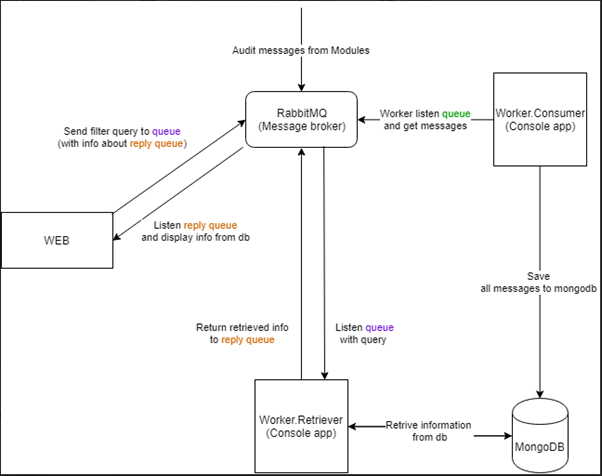
For audit module we have some predefined queues and exchanges:
1. Exchange AuditExchange with binded NotPersonalizedAuditQ queue.
2. Exchange AuditRPCReqExchange with binded AuditRPCReqQ queue.
Another modules don′t require specific exchanges/queues - applications create them manually.
General Info
All highlighted db names mean that all this dbs will be the same(ex. auth at IdentityServer and auth at IdentityServer Web - one database).
All highlighted urls change to your public urls(available from web).
Default username/password - administrator@test.ad / Admin123!
Each container running under 2 ports inside docker container(5443 https and 5000 http). Expose it to available ports on machine(Person container: 5443 - 8000, 5000 - 8100, Person Api container: 5443 - 8001, 5000 - 8101 etc.). Setup your redirect proxy (ex. nginx) to redirect request on this ports.
Minimum requirements for hosting machines:
Single instance:
|
|
CPU
|
RAM
|
HDD
|
|
Worker (1)
|
0.3
|
0.5
|
8
|
|
Web/Api (1)
|
1
|
1
|
8
|
|
|
|
|
|
|
Sum(8 apps + 4 workers)
|
9.2
|
10
|
96
|
Distributed:
|
|
vCPU
|
RAM
|
HDD
|
|
Worker (1)
|
1
|
1
|
16
|
|
Web/Api (1)
|
2
|
2
|
16
|
|
|
|
|
|
|
Sum(8 apps + 4 workers)
|
20
|
20
|
192
|
Docker version 18.09.2.
General structure:
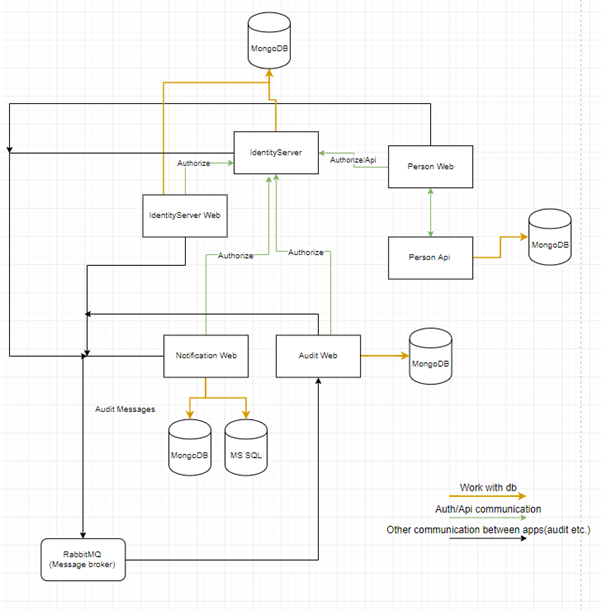
Audit structure:
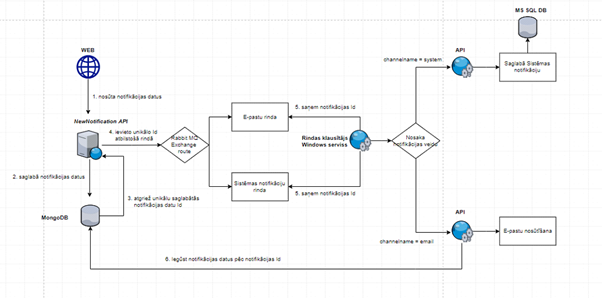
Notification Module structure:
|

